

Broken Speedometer? Use Your iPhone as a Replacement
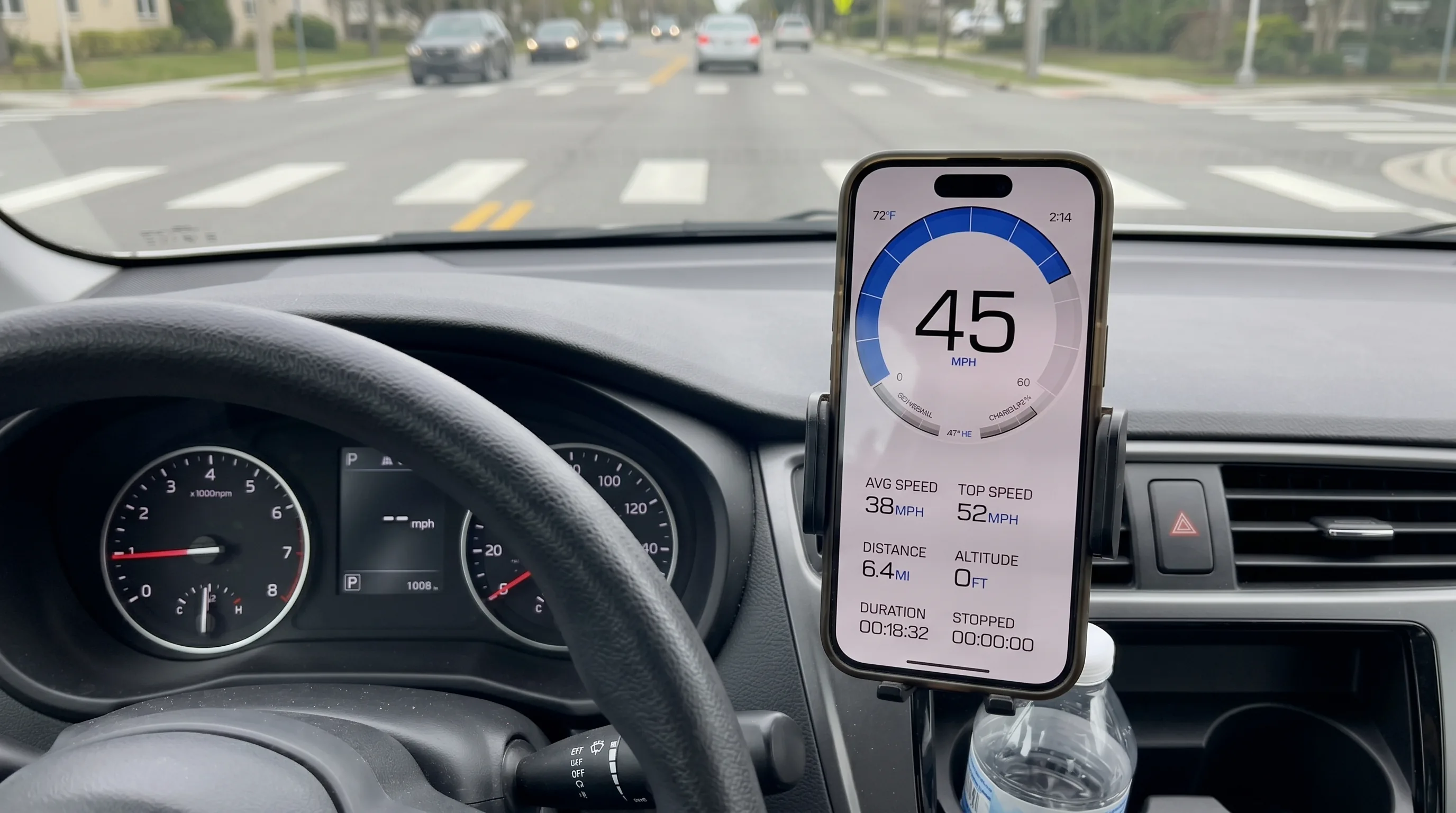
GPS Speedometer provides accurate speed readings when your car, motorcycle, or truck speedometer is broken or inaccurate.

Legal Disclaimer
Use the app as a supplementary speed display while arranging a repair. It does not replace required vehicle equipment; check the rules that apply to your vehicle.
Common Broken Speedometer Problems
Car Speedometer Not Working
Common causes include:
- Faulty speed sensor
- Broken speedometer cable (older vehicles)
- Dashboard electrical issues
- ECU or instrument cluster failure
Repair Cost: $100-$400+ depending on the issue. Learn more about car speedometer features.
Motorcycle Speedometer Broken
Many motorcycles:
- Come without speedometers (dirt bikes, track bikes)
- Have unreliable mechanical speedometers
- Suffer from cable failures or sensor issues
- Need replacement after accidents or modifications
Repair Cost: $150-$600+ for OEM replacement. Check our motorcycle GPS speedometer.
Classic Car Inaccurate Speedometer
Older vehicles often have:
- Worn mechanical cables causing incorrect readings
- Gear ratio changes from engine swaps or tire size changes
- Aging components with 5-15% inaccuracy
- Expensive or unavailable replacement parts
Repair Cost: $200-$1000+ for restoration or conversion. Visit our classic car speedometer.
RV/Truck Speedometer Issues
Large vehicles face:
- Inaccuracy after tire size changes or modifications
- Complex dashboard removal for repairs
- Expensive dealership diagnostics ($100-$200+)
- Long repair times leaving vehicle unusable
Repair Cost: $300-$800+ for professional repair
How to Fix a Speedometer That Stopped Working
A dead speedometer usually comes down to one of four parts: a fuse, the speed sensor, the cable on older vehicles, or the instrument cluster. Check them in this order, cheapest and simplest first, and stop when you find the fault. Locations and procedures vary by make, model and year, so keep your owner's manual or a service manual handy.
Safety first
Never try to diagnose the speedometer while driving. Note what the gauge does on the road, then pull over somewhere safe and do the checks parked with the engine off. Take the key out while you work on fuses, and switch the ignition on only when a diagnostic scanner's instructions ask for it.
- 1
Check the fuse first
Usually DIYIt is the cheapest part to rule out. Your owner's manual shows which fuse feeds the instrument cluster; many vehicles have no fuse for the speedometer alone. If it has blown, replace it with a fuse of the same rating. If the new fuse blows again, stop there: something is shorting, and that is a job for a mechanic.
- 2
Then suspect the speed sensor
DIY on some vehiclesMost modern vehicles drive the speedometer from a speed-sensor signal. Clues that point here: the speedometer and odometer stop together, the ABS or traction-control light comes on, cruise control stops working, or an automatic gearbox shifts oddly. Have the stored fault codes read before you buy any part, by a garage or with a scanner that can also read the ABS and transmission modules. A basic OBD-II code reader often shows only engine codes, so finding nothing there does not rule out the sensor.
- 3
On older vehicles, check the cable
Often DIYVehicles with a mechanical speedometer use a cable driven from the gearbox or a wheel. A needle that bounces, a ticking or squealing noise behind the dashboard, or a needle stuck at zero while the odometer has stopped too usually means a worn or broken cable or drive gear.
- 4
Then look at the instrument cluster
Specialist jobIf the odometer still counts but the needle does not move, or several gauges, warning lights or the display fail together (with the fuse already checked), the fault is more likely in the cluster itself. Cluster repair and replacement are specialist work: a replacement unit may need coding to the vehicle, and the recorded mileage must stay correct.
- 5
When to see a mechanic
MechanicBook a mechanic or auto electrician if a new fuse blows again, if warning lights such as ABS or check-engine come on with the fault, if the clues point to wiring or the cluster, or whenever you are unsure. We do not sell parts or repair services; the costs below are rough guides, not quotes.
Speedometer working but reading off rather than dead? If you recently changed tire or wheel size, estimate that effect with our tire-size speedometer calculator. If the tires are unchanged, or the error comes and goes, go back to the speed-sensor and cluster checks above.
Waiting for the repair? A GPS speedometer app can show your speed in the meantime. It cannot tell you which part has failed, so treat it as a stand-in, not a diagnostic tool.
Speedometer Repair Cost Breakdown
| Issue Type | Typical Repair Cost | Time Required |
|---|---|---|
| Speed Sensor Replacement | $100-$250 | 1-2 hours |
| Speedometer Cable (mechanical) | $120-$300 | 1-3 hours |
| Instrument Cluster Repair | $200-$500 | 2-4 hours |
| Instrument Cluster Replacement | $300-$800 | 2-5 hours |
| ECU/Computer Module Issue | $400-$1,200 | 3-8 hours |
| Classic Car Restoration | $500-$2,000+ | Days to weeks |
| GPS Speedometer App | FREE | 2 minutes |
Note: Repair costs vary by vehicle make, model, year, and location. Luxury and European vehicles typically cost 50-100% more. Labor rates range from $80-$150/hour depending on your area. Dealerships charge premium rates compared to independent mechanics.
Why GPS Speedometer is a Great Alternative
GPS speed and its limits
GPS provides an estimate of speed over ground, independent of wheel size. Signal quality, obstructions, low speed and processing can affect the reading. A fixed percentage error or greater accuracy than another instrument is not guaranteed.
Saves Money
Use the app as a supplementary speed display while arranging a repair. It does not replace required vehicle equipment; check the rules that apply to your vehicle.
Works Immediately
No waiting for repair appointments or parts. Download, allow location access, and start tracking speed within minutes. No installation or vehicle modifications required.
Works Offline
Core GPS speed tracking works without internet. Once you have GPS signal, you can track speed anywhere - even in remote areas with no cell service.
Additional Features
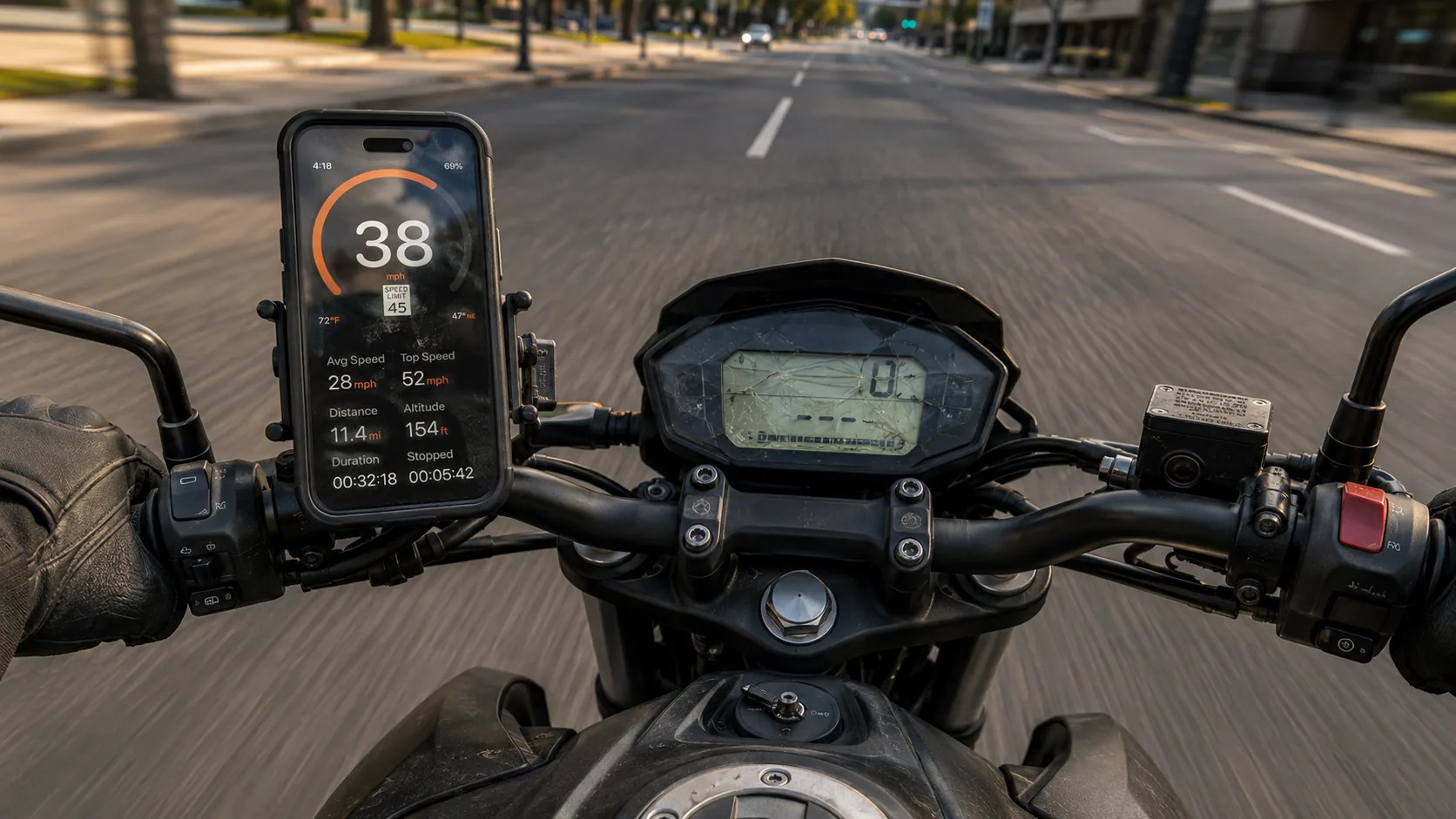
Beyond just speed, get trip recording, distance tracking, altitude, max speed, average speed, and route history. Learn about advanced tracking features.
Speed Limit Alerts
Automatic road-based speed limit detection with customizable warnings. Stay aware of limits even without a working speedometer.
Speedometer completely dead? You can turn your phone into a digital speedometer right now — a live GPS readout in your browser, no install needed.
How to Use iPhone as Speedometer
Download GPS Speedometer
Free download from the App Store. Works on iPhone and iPad with GPS.

Allow Location Access
Grant "Always" or "While Using" location permission for GPS tracking to work.
Mount Your iPhone
Use a dashboard mount, vent mount, or windshield mount to position iPhone where you can see it safely while driving.
Wait for GPS Signal
Allow time for a usable location reading and keep a clear view of the sky. Acquisition time varies with the device and surroundings; there is no fixed waiting time.
Start Driving
Speed will update in real-time. Optional: Use HUD mode to project speed onto windshield or enable speed limit alerts.
Pro Tips for Best Accuracy
Clear Sky View
Position iPhone with unobstructed view of sky. Avoid placing under metal dashboards or in glove box.
Keep Charged
GPS tracking uses battery. Use car charger for long trips or continuous use.
Enable Data Connection
While core speed tracking works offline, data connection helps with faster GPS lock and enables speed limit detection.
Wait for Accurate Reading
GPS provides an estimate of speed over ground, independent of wheel size. Signal quality, obstructions, low speed and processing can affect the reading. A fixed percentage error or greater accuracy than another instrument is not guaranteed.
Safe Mounting
Ensure mount is secure and doesn't obstruct your view or airbags. Never hold phone while driving.
Use a Vibration-Damping Mount on Bikes & Scooters
Sustained high-frequency vibration from small two-stroke engines (motorcycles, mopeds, older scooters) can degrade the iPhone's optical image stabilization over time. If you're mounting on handlebars, use a vibration-damper accessory (Quad Lock Vibration Dampener, RAM Mount with cushioned ball) — not just a plain bar clamp.
Frequently Asked Questions
GPS provides an estimate of speed over ground, independent of wheel size. Signal quality, obstructions, low speed and processing can affect the reading. A fixed percentage error or greater accuracy than another instrument is not guaranteed.
Laws vary by jurisdiction. Some areas require functional built-in speedometers for road use. GPS Speedometer is best used as a temporary solution or supplement while you arrange proper repairs. Check your local vehicle equipment laws.
Core GPS speed tracking and trip recording work without internet, with location permission and a usable GPS signal. Automatic road-speed-limit data and weather need internet. Maps and other connected features may be unavailable offline.
Absolutely. Many motorcyclists use GPS Speedometer on bikes without speedometers (dirt bikes, track bikes) or with broken gauges. Mount your iPhone on handlebars and track speed, distance, and trip data. Works great for both bicycles and motorcycles.
Free to download, with no ads. PRO is available through a subscription or a one-time purchase; both unlock the same PRO features. The price depends on your region and current offer; check Apple’s purchase screen. Recording, saving and basic viewing of trips are free. Detailed route playback and analysis require PRO. PRO unlocks route playback, speed and altitude charts, and detailed trip analysis. Trips saved while PRO stay unlocked if PRO later expires.
GPS Speedometer works with any vehicle: cars, motorcycles, trucks, RVs, classic cars, boats, and even bicycles. It measures actual ground speed via GPS, so it's independent of vehicle type or speedometer mechanism.
Use a dashboard mount, vent mount, or windshield mount to position iPhone where you can glance at it safely. Ensure the mount is secure and doesn't obstruct your view, controls, or airbags. Never hold your phone while driving.
Battery use varies with the device, battery health, screen brightness, signal and enabled features. No fixed hourly drain or runtime has been established for the app. For long trips, plan a suitable charger or power bank. GPS can continue in the background while recording a trip or using Picture-in-Picture. Picture-in-Picture requires PRO.
Related guides
Classic-car speedometer guide
Vintage gauges that quit decades ago — same GPS fix, chrome untouched.
RV speedometer guide
Older RV clusters fail too. Bonus: tire-size accuracy.
Motorcycle speedometer guide
Stock cluster dead? Same fix, on two wheels.
Scooter speedometer guide
Many scooters never had a working speedometer to begin with.
GPS vs analog accuracy
Why GPS reads truer than a worn mechanical cluster.
Tire-size speedometer calculator
Free tool that quantifies how much your speedometer is off after a tire change.
Speed-limit alerts
A bonus you couldn’t get from a stock dashboard repair.
Speed camera alerts
On the road again? Get warned about upcoming speed cameras across 40+ countries.
Ready to Replace Your Broken Speedometer?
Download GPS Speedometer and start tracking your speed accurately today.

6.3M+ downloads • ★ 4.7 on the U.S. App Store • iOS 17.0+