
GPS Speedometer app icon
speedometer.app GPS Speedometer for iPhone
GPS accuracy on curves GPS speed on winding roads Doppler speed measurement

GPS Accuracy on Curves vs Straight Roads

The myth: GPS speed goes wrong on curves. The truth: Doppler keeps your speed accurate through any bend — it's your logged distance that reads short. Here's why the two behave differently.

speedometer.app team
November 2, 2025
Updated
29 min read
GPS Accuracy on Curves vs Straight Roads
Table of Contents

Introduction

You’re carving through a mountain switchback, and you’ve heard the warning that GPS speedometers “lose accuracy on curves.” So you glance down at your phone expecting a wrong number — and it’s right. That’s not luck. It’s how the physics actually works (see our full guide on how GPS speedometers work), and it’s the opposite of what most articles (including an earlier version of this one) will tell you.

The real story has two halves, and the whole point of this guide is that they behave completely differently:

  • Your speed reading on a curve is accurate. A modern phone measures speed from the Doppler shift of the satellite carrier — your true instantaneous velocity at each moment — and that measurement doesn’t care how the road bends. Through a hairpin at a steady 40 mph64 km/h, a well-built GPS speedometer reads within about 1%.
  • Your logged distance on a curve reads short. The trip-meter, the recorded track, the squiggle on the map — that number is built by connecting GPS position samples with straight lines, and on a twisty road those straight lines cut the corners. This is “corner clipping,” and it’s real. It just affects distance, not the speed on your display.

Same drive, two numbers, two totally different behaviors. Most explanations blur them together and conclude “GPS speed is wrong on curves.” It isn’t — but the reasoning behind that myth (straight lines between position samples) is exactly what makes your distance read low. This guide untangles the two: why Doppler keeps your speedometer honest through a bend, why corner clipping quietly shortens your logged distance, how the 1 Hz sample rate of an iPhone plays in, and when a higher-rate device actually matters. (New to the fundamentals? Start with how GPS speedometers work.)

Key Takeaways

  • Your GPS speed stays accurate on curves. Phone speed comes from Doppler shift (instantaneous velocity), which is unaffected by path curvature — expect ~1% error through a hairpin, not 10%.
  • Corner clipping is a distance error, not a speed error. Straight lines between 1 Hz position samples cut corners, so your logged distance/track/trip-meter reads short on twisty roads — 2-5% per moderate corner, more on tight ones, and it accumulates.
  • The “GPS speed reads 10-36% low on curves” claim is a myth — that figure is the distance shortfall, wrongly applied to the speed number.
  • iPhone GPS is 1 Hz. That’s fine for the speed display anywhere; it mainly limits track/distance fidelity on curves and responsiveness to hard acceleration.
  • Higher update rates (5-100 Hz) buy distance/track precision and faster transient response — not steady-state speed accuracy on a bend.
  • Real curve speed wobble comes from multipath, poor satellite geometry, or brief signal dropout — reflections off canyon walls, not corner clipping.
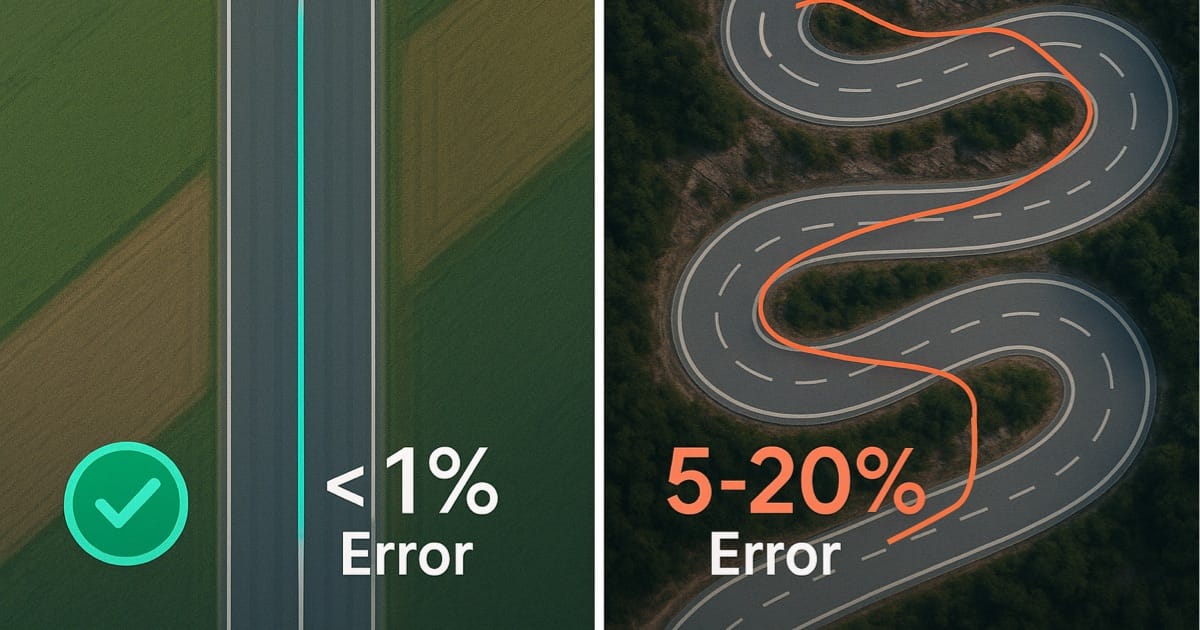
  • Straight roads: both speed and distance are <1% off under clear sky — GPS’s best case.

Understanding GPS Position Sampling and Update Rates

Before diving into curve-specific problems, you need to understand how GPS receivers sample position over time—this fundamental process determines all speed calculations. (For a deeper dive into GPS technology, see our guide on how GPS speedometers work.)

What Is GPS Update Rate (Hz)?

Think of GPS update rate as how many “snapshots” your phone takes of your location every second. More snapshots = more detail = better accuracy on curves.

Your iPhone: 1 Hz (1 snapshot per second)

  • One position reading every second
  • At 60 mph97 km/h, that’s 88 feet27 meters between snapshots
  • Perfect for highways and everyday driving
  • Less accurate on very tight curves (hairpins, track corners)
  • What 99% of people use

Dedicated GPS devices: 5-10 Hz (5-10 snapshots per second)

  • Position readings every 0.1-0.2 seconds
  • At 60 mph97 km/h, that’s 8-17 feet2.4-5.2 meters between snapshots
  • Captures curve detail way better
  • Costs $100-300

Performance boxes: 20-25 Hz (like Dragy)

  • Position readings 20-25 times per second
  • Excellent accuracy for track days
  • Costs around $200-300

Professional racing telemetry: 50-100 Hz

  • What Formula 1 teams use
  • Costs $10,000-50,000+

The jump from 1 Hz to 5 Hz is huge on curves—literally five times more data points to trace the actual path you drove.

How GPS Calculates Speed From Position

GPS uses two primary methods to determine speed, and understanding both reveals why curves create unique challenges. For more detail on these methods, read our article on how GPS speedometers work.

Method 1: Position-based calculation

  1. Record position at time T1 (latitude, longitude)
  2. Record position at time T2 (latitude, longitude)
  3. Calculate straight-line distance between points
  4. Divide distance by time elapsed
  5. Report speed = distance ÷ time

Example on straight road:

  • Position 1: 40.7128° N, 74.0060° W at 0.00 seconds
  • Position 2: 40.7129° N, 74.0059° W at 1.00 seconds
  • Distance: 100 feet30.5 meters actual path traveled
  • Speed: 68.2 mph109.8 km/h ✓ Accurate

Same example on curved road:

  • Position 1: Start of 90° corner at 0.00 seconds
  • Position 2: End of 90° corner at 1.00 seconds
  • GPS calculates: Straight-line distance (chord)
  • Actual path: Curved arc (longer than chord)
  • Result: distance under-measured — the chord is shorter than the arc

Important: this under-measures the distance for your trip-meter and recorded track. It does not pull down the speed on your display, because that number comes from the Doppler method below, not from this chord calculation.

Method 2: Doppler shift measurement

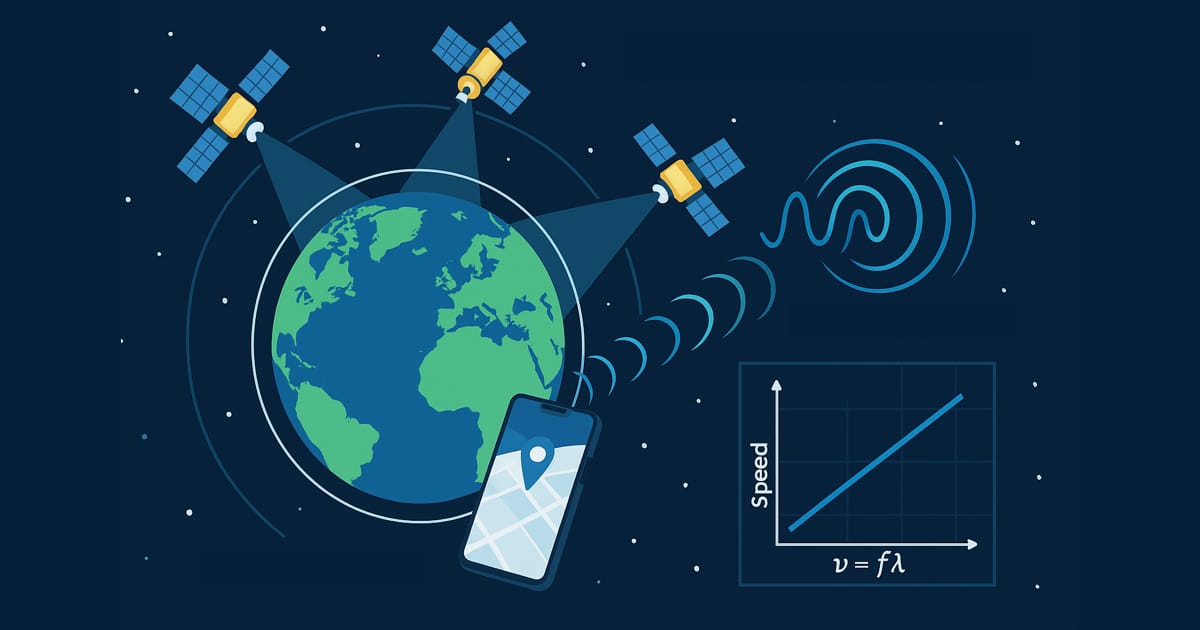
GPS satellites transmit at precise frequencies. As you move relative to satellites, received frequencies shift (Doppler effect). This shift directly indicates velocity without requiring position accuracy.

Doppler advantages:

  • Direct velocity measurement
  • Not dependent on position accuracy
  • Less affected by multipath errors
  • Smooth readings even with position noise

Why Doppler stays accurate through a curve:

  • Each satellite gives a line-of-sight (radial) Doppler measurement; the receiver combines four or more of them into your full 3D velocity vector
  • Your speed is the magnitude of that vector — a scalar that’s correct no matter which direction you’re pointed
  • So when the road bends, the direction of the vector rotates, but its magnitude (your speed) is still measured correctly at that instant
  • Peer-reviewed GNSS research finds a vehicle’s motion state — turning, braking, accelerating — has little influence on Doppler velocity estimation, unlike position-differenced velocity

This is the crux: modern receivers report speed primarily from Doppler, so the speed on your display is essentially immune to path curvature. Position-differencing (chord-between-samples) is what builds your distance/track — and that’s where curves cause trouble. Keep those two straight and the rest of this article makes sense.

Diagram: a GPS satellite's carrier wave reaching a moving car with a velocity arrow — speed is read directly from the Doppler shift, independent of the path shape.
Your speedometer reads the Doppler shift of the satellite carrier — your instantaneous velocity vector. Its magnitude (your speed) is measured correctly whichever way the road bends.

The Sampling Rate Problem

At 1 Hz (standard smartphone rate), GPS records your position once per second. If you’re driving 60 mph97 km/h, you travel 88 feet27 meters between position samples—far enough to complete most corner entries or exits.

Distance traveled between GPS samples:

Speed1 Hz (1/sec)5 Hz (0.2/sec)10 Hz (0.1/sec)
30 mph48 km/h44 feet13.4 m8.8 feet2.7 m4.4 feet1.3 m
45 mph72 km/h66 feet20.1 m13.2 feet4.0 m6.6 feet2.0 m
60 mph97 km/h88 feet26.8 m17.6 feet5.4 m8.8 feet2.7 m
75 mph121 km/h110 feet33.5 m22 feet6.7 m11 feet3.4 m

On a tight hairpin turn with 100-foot30-meter radius, 1 Hz GPS captures only 2-3 position points through the entire corner. That’s insufficient data to accurately trace the curved path—GPS simply draws straight lines between these few points, cutting the corner short.

The Corner Clipping Phenomenon

Corner clipping (also called corner truncation) is the primary cause of GPS distance under-measurement on curves — the trip-meter and recorded track, not the speed on your display. According to Wikipedia’s GPS error analysis, this geometric problem occurs when GPS calculates straight-line distance between widely-spaced position samples rather than measuring the actual curved path traveled. Everything in this section is about that distance shortfall; your Doppler speed reading rides through it unaffected.

Diagram: a curved road with GPS position samples joined by straight chords that cut across the inside of the arc, showing logged distance coming up short while the speed reading stays true.
Corner clipping: at 1 Hz, GPS joins position samples with straight chords (orange) that cut inside the real arc of the road — so your recorded distance comes up short. Your Doppler speed, measured continuously, stays true (green).

How Corner Clipping Works

Imagine driving a perfect 90-degree corner with a 164-foot50-meter radius. Your actual path follows the curved arc, traveling approximately 257 feet78.5 meters (πr/2). But 1 Hz GPS samples your position at the corner entry and corner exit—two points separated by a straight line.

Geometry of corner clipping:

Actual path (arc length):

  • 90° corner with 164-foot50-meter radius
  • Arc length: πr/2 = π(50)/2 = 257 feet78.5 meters
  • Distance traveled: 257 feet78.5 meters

GPS measurement (chord length):

  • Straight line connecting entry and exit points
  • Chord length: r√2 = 50√2 = 232 feet70.7 meters
  • GPS calculates: 232 feet70.7 meters

Error:

  • Under-reading: 25.6 feet7.8 meters
  • Error percentage: 7.8/78.5 = 9.9% under-reading

This 10% shortfall on a single 90-degree corner is a real hit to your logged distance — GPS records 232 feet70 meters of track when you actually covered 257 feet78 meters. Your speedometer, reading Doppler, still shows your true speed the whole way around; it’s the trip odometer and the recorded route that come up short.

Real-World Corner Clipping Examples

Gentle highway curve (3,281-foot1,000-meter radius, 15° bend):

  • Actual distance: 859 feet261.8 meters
  • GPS 1 Hz chord: 855 feet260.5 meters
  • Distance error: 0.5% short
  • Speedometer impact: none — Doppler speed reads true

Moderate mountain road (328-foot100-meter radius, 45° bend):

  • Actual distance: 257 feet78.5 meters
  • GPS 1 Hz chord: 251 feet76.5 meters
  • Distance error: 2.5% short
  • Speedometer impact: none — Doppler speed reads true

Tight hairpin (164-foot50-meter radius, 120° bend):

  • Actual distance: 343 feet104.7 meters
  • GPS 1 Hz chord: 284 feet86.6 meters
  • Distance error: 17.3% short
  • Speedometer impact: none — Doppler speed reads true (an app that computes speed from these chords would show ~17% low; a Doppler one does not)

Autocross/gymkhana (66-foot20-meter radius, 180° bend):

  • Actual distance: 206 feet62.8 meters
  • GPS 1 Hz chord: 131 feet40 meters
  • Distance error: 36% short
  • Speedometer impact: none — Doppler speed reads true

The tighter the curve and the larger the angle, the worse corner clipping gets — for distance. GPS systematically under-measures logged distance on turns because straight-line calculations miss the extra path length of the arc. The Doppler-derived speed on your display isn’t part of this calculation, so it doesn’t inherit the error. (The one exception: a poorly-built app that derives speed by dividing these clipped chords by time would show the under-read — a good reason to pick an app that uses the receiver’s native velocity.)

Visualization of GPS Path vs Actual Path

Picture a winding mountain road with five consecutive switchbacks. Your vehicle follows the snaking path precisely, traveling perhaps 1,640 feet500 meters through the sequence. But 1 Hz GPS captures only 5 position points—one at the beginning, one after each switchback, and one at the end.

When GPS connects these five points with straight lines, it creates a simplified, jagged representation of your actual smooth curved path. Each straight-line segment cuts across the inside of each curve, shortening the calculated distance by 5-15% per corner. Over five switchbacks, cumulative error reaches 20-30%.

This is why GPS tracks often look like simplified, angular approximations of actual roads when viewing recorded routes—especially at lower sampling rates.

GPS Accuracy on Straight Roads: The Baseline

To appreciate GPS curve problems, first understand GPS performance on straight roads—the ideal scenario where GPS technology excels.

Optimal GPS Performance Conditions

Straight roads with clear sky visibility provide perfect conditions for GPS accuracy. No curves to clip, constant heading, and simple distance calculations.

Factors enabling optimal straight-road accuracy:

Satellite geometry:

  • 8-12 satellites visible
  • Wide angular distribution
  • Low HDOP - Horizontal Dilution of Precision (<2 is excellent)
  • Multiple orbital planes

Signal quality:

Motion characteristics:

  • Constant heading (no direction changes)
  • Steady speed (minimal acceleration)
  • Predictable velocity vector
  • Doppler shift clearly defined

Environmental factors:

  • Open highway or rural road
  • No tall buildings or terrain
  • Minimal tree canopy
  • Good weather

Under these conditions, GPS accuracy reaches its peak performance, typically ±7-16 feet±2-5 meters for position and ±0.1 mph±0.16 km/h for speed.

Straight Road Speed Accuracy Measurements

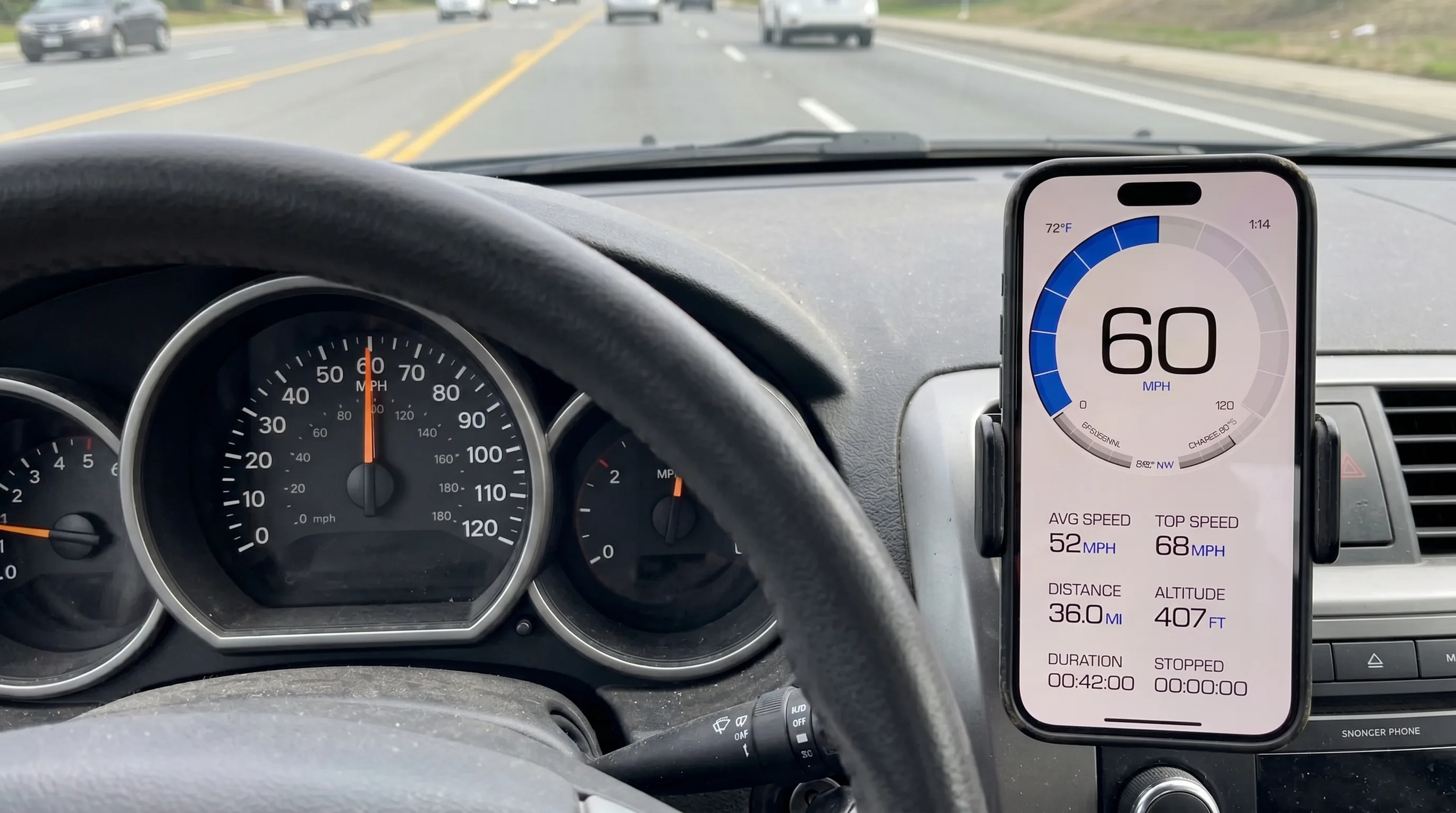
Real-world testing consistently demonstrates GPS speed accuracy well under 1% on straight roads.

Highway test scenario:

  • Location: Interstate 80, Nebraska
  • Conditions: Clear sky, flat terrain, 70 mph113 km/h speed limit
  • Device: iPhone 14 Pro (dual-frequency GPS)
  • Reference: Mile marker timing over 5 miles8 km

Results:

  • True speed (mile marker method): 70.0 mph112.7 km/h
  • GPS reading: 69.9-70.1 mph112.5-112.8 km/h
  • Average error: ±0.1 mph±0.2 km/h
  • Error percentage: 0.14%

Multiple speed test results:

True SpeedGPS AverageError% Error
30 mph48 km/h30.1 mph48.4 km/h+0.1 mph+0.2 km/h0.33%
45 mph72 km/h45.0 mph72.4 km/h0.0 mph0.0 km/h0.00%
60 mph97 km/h59.9 mph96.4 km/h-0.1 mph-0.2 km/h0.17%
75 mph121 km/h75.2 mph121 km/h+0.2 mph+0.3 km/h0.27%

These sub-1% errors represent near-perfect accuracy—GPS speed on straight roads rivals professional timing equipment.

Why Straight Roads Are Ideal for GPS

The mathematical simplicity of straight-line motion eliminates most GPS calculation challenges.

Straight-line advantages:

Distance calculation:

  • Position 1 to Position 2 follows actual path
  • No corner clipping
  • Straight-line distance = actual distance traveled
  • Haversine formula accurately calculates distance

Velocity determination:

  • Constant heading simplifies Doppler calculations
  • Satellite velocity vectors change gradually
  • Direction changes are minimal
  • Acceleration typically gradual

Error cancellation:

  • Position errors in same direction cancel out
  • Atmospheric delays affect consecutive measurements similarly
  • Short-term position noise averages out
  • Systematic errors remain constant

Update rate less critical:

  • Even 1 Hz captures straight motion adequately
  • Position samples along same line
  • Missing intermediate points doesn’t lose path information
  • Speed calculation remains accurate

On straight roads, GPS technology performs exactly as designed—providing excellent absolute accuracy that typically exceeds the precision of car speedometers, which intentionally over-read by 3-10%.

GPS Performance on Curved and Winding Roads

Curves introduce fundamental challenges that degrade GPS accuracy, particularly at standard update rates. Understanding these challenges helps explain observed GPS behavior on mountain roads, racetracks, and winding routes.

Real-World Curve Performance

According to research on GPS positioning errors, GPS position accuracy degrades on curves due to sampling-rate limits and straight-line interpolation between fixes — which is exactly what shortens your recorded track. Here’s how that translates to what you actually see, keeping speed and distance separate:

Highway ramps (gentle curves):

  • Distance/track: 1-3% short
  • Speedometer: accurate (Doppler) — reads your true 45 mph72 km/h

Mountain switchbacks (tight curves):

  • Distance/track: 5-10% short over the sequence
  • Speedometer: accurate — a steady 33-35 mph53-56 km/h reads as 33-35 mph53-56 km/h

Hairpins (extreme curves):

  • Distance/track: 10-30%+ short (the recorded line basically draws a chord across the hairpin)
  • Speedometer: still accurate — Doppler measures your instantaneous speed regardless of the clipped path

The pattern: tighter curves shorten your logged distance more, but your speed reading holds. That’s not your phone being clever — it’s fundamental to how Doppler velocity works. Where a higher-rate device (Dragy at 25 Hz, $219; F1 telemetry at 50-100 Hz) earns its keep is track geometry and distance/lap precision, plus catching fast transients — not making your steady-state speed on a bend more correct.

Continuous Winding Roads (Canyon Carving)

Roads with continuous flowing curves present sustained GPS challenges. Unlike isolated corners with straight sections between, continuous winding roads never give GPS a chance to “reset” accuracy on straights.

A mountain biker on a winding singletrack trail with a phone running the GPS Speedometer app mounted on the handlebars.
Linked curves like these are where the distance math works hardest — your speed reading stays honest through them, but the recorded track length clips short on every bend.

Continuous curve characteristics:

Cumulative error problem:

When corners connect without straight sections, GPS corner clipping errors accumulate. Each curve adds 1-5% under-reading, and without straight sections to provide accurate references, total distance error grows.

5-mile8 km winding road example:

  • Actual distance: 5.00 miles8.05 km
  • 1 Hz GPS measures: 4.70-4.85 miles7.56-7.80 km - 3-6% short
  • 5 Hz GPS measures: 4.90-4.95 miles7.88-7.96 km - 1-2% short
  • 10 Hz GPS measures: 4.95-4.98 miles7.96-8.01 km - <1% short

This cumulative under-reading explains why GPS-based trip meters read low on very twisty routes—you’ve actually traveled farther than GPS calculates.

The Math Behind GPS Curve Errors (Simple Version)

Here’s the core problem in plain English: GPS measures distance using straight lines between position points. Curves aren’t straight. That mismatch is where all the error comes from.

Straight Line vs Curved Path

Imagine a 90-degree corner with a 164-foot50-meter radius (pretty typical for a mountain road). If you follow the actual curved path, you travel 257 feet78.5 meters. But GPS just connects the entry and exit points with a straight line—that measures only 232 feet70.7 meters.

The result: GPS thinks you traveled 25.6 feet7.8 meters less than you actually did. That’s a 10% error on a single corner.

The worse the curve, the worse the distance shortfall:

Curve TypeAngleDistance error (chord vs arc)
Gentle highway curve30°0.8% short
Moderate turn60°4.6% short
Sharp 90° corner90°9.9% short
Tight switchback120°17.3% short
Hairpin180°36.4% short

Notice how it explodes as curves get tighter? On a 180° hairpin the chord is 36% shorter than the arc — so your recorded track comes up 36% short through that corner. Your speedometer, reading Doppler, still shows your true speed; the shortfall lives entirely in the distance/track number.

The Sample-Density Problem (for track shape)

The faster you go through a curve, the fewer GPS position snapshots land inside it — which blurs the recorded shape of the corner, not your speed reading.

Slow hairpin (20 mph32 km/h, takes 6 seconds):

  • 1 Hz iPhone GPS: 6 position points
  • Not great, but captures the basic shape

Fast chicane (50 mph80 km/h, takes 1.3 seconds):

  • 1 Hz iPhone GPS: 1-2 position points
  • Not enough points to trace the curve’s geometry accurately

This is why track-day lap timing and corner analysis require dedicated high-rate GPS devices: at racing speeds through tight corners, 1 Hz doesn’t capture enough positional detail to reconstruct your line. It still reports your speed fine the whole time — the speed comes from Doppler, which needs no positional detail at all.

What Update Rate Do You Actually Need?

For 99% of drivers: 1 Hz (your iPhone) is fine

  • Perfect on straight roads where speed limits matter
  • Acceptable on highway curves
  • Free (you already own it)
  • GPS Speedometer app uses your iPhone’s standard GPS

For track days & performance testing: 20-25 Hz

  • Devices like Dragy: $219
  • Captures corner detail accurately
  • Perfect for 0-60, lap times, drag racing

For professional racing: 50-100 Hz

  • Costs $10,000-50,000+
  • F1-grade accuracy
  • Overkill for everyone else

Technical Factors Affecting GPS Accuracy on Curves

Beyond update rate, several technical factors influence how accurately GPS tracks curved path movement.

If Your Speed Seems to “Lag” in Corners, It’s the App — Not Doppler

A raw Doppler speed reading doesn’t lag through a steady-speed corner; it measures your instantaneous velocity magnitude every epoch. So if you do see the number sag through an apex, the cause is almost always one of two app-level choices, both fixable:

  • Over-aggressive smoothing. Some apps run a heavy filter to steady the display on straights. That filter can treat your genuine turn as noise and drag the number down. A good app smooths lightly and leans on the native velocity solution.
  • Position-differenced speed. An app that computes speed itself (distance ÷ time between fixes) inherits corner clipping and will read low through a bend. One that reads the receiver’s Doppler velocity (CLLocation.speed on iOS) does not.

Genuine GPS speed lag is real in one situation, and it isn’t cornering: hard acceleration or braking, where 1 Hz sampling can trail a fast transient by a fraction of a second. Holding a steady speed around a curve is not that situation.

Satellite Geometry Changes During Turns

According to Penn State’s GPS error analysis, satellite geometry significantly impacts GPS accuracy. As you turn through curves, the relationship between your receiver and satellites shifts, temporarily degrading precision.

What affects accuracy on curves:

  • HDOP increases (Horizontal Dilution of Precision—basically GPS getting less accurate) during rapid heading changes
  • Phone orientation matters: flat on dashboard = best, in cupholder = worst
  • Multipath errors: Mountains and canyons reflect GPS signals, adding noise exactly where curves are tightest
  • Motorcycles have an advantage: no roof blocking satellites

How Professional Racing Solves This Problem

Formula 1 teams aren’t using iPhones for lap timing. Here’s what they use instead—and why it costs as much as a car.

How Professional Systems Solve This

Professional racing GPS systems operate at 50-100 Hz—that’s 50-100 position snapshots per second, compared to your iPhone’s 1 snapshot per second.

What higher update rates buy you:

SystemUpdate RateHairpin AccuracyCost
Your iPhone1 Hz±10-20% error$0 (free)
Dedicated GPS5-10 Hz±2-5% error$100-300
Dragy Performance Box25 Hz±1% error$219
VBOX Sport20 Hz±1% error$540-800
F1 telemetry50-100 Hz±0.1% error$10,000-50,000+

For everyday driving, your iPhone’s free GPS is perfect. For track days, Dragy ($219) or VBOX Sport ($540-800) are great options depending on your needs and budget.

Why Professional Systems Cost So Much

It’s not just about update rate. Professional GPS systems combine multiple technologies:

RTK corrections (Real-Time Kinematic):

  • Uses a fixed base station broadcasting correction signals
  • Achieves centimeter-level accuracy
  • Eliminates atmospheric errors
  • Requires cellular or radio link
  • Adds $5,000-20,000 to system cost

IMU sensors (Inertial Measurement Unit):

  • High-precision accelerometers and gyroscopes
  • Updates 100-1000 times per second
  • Detects direction changes instantly
  • Maintains speed estimates during brief GPS dropouts
  • Costs $2,000-10,000 for professional-grade units

These professional IMU systems are orders of magnitude more precise than consumer-grade sensors, enabling centimeter-level position tracking even during GPS signal loss.

Who Actually Needs Better GPS?

Everyday drivers: Your iPhone is fine — everywhere, including twisty backroads. The speed on your display is Doppler-accurate through the corners just like it is on the highway. The only thing that reads a little short on a winding route is your trip distance, and that rarely matters for daily driving. The GPS Speedometer app is accurate for it.

Motorcyclists & cyclists: You have an advantage (no roof blocking satellites) and you seek out the curviest roads — good news, because your speed reads true through those corners. What can come up a touch short on a very twisty ride is your logged distance/route. GPS Speedometer works great for motorcycle and cycling needs; just know your recorded mileage on a hairpin-heavy day may read slightly low.

Track day enthusiasts: Get a Dragy ($219) or similar 20-25 Hz device if you need precise lap timing and corner analysis. Your iPhone works for casual track days but won’t give you the corner-by-corner accuracy needed for serious performance analysis.

Professional racers: You’re already using $50,000+ telemetry systems. This blog post isn’t for you.

Improving GPS Accuracy on Winding Roads

While you can’t change GPS satellite positions or the 1 Hz update rate of iPhone GPS, several strategies maximize accuracy through curves.

Optimize Phone Mounting Position

GPS signal quality depends heavily on antenna sky visibility. Proper phone mounting improves satellite reception.

Best mounting practices:

For cars:

  • Dashboard mount facing up through windshield
  • Windshield mount (check local laws)
  • Center console if no sunroof obstruction
  • Use HUD mode to view reflection in windshield

Avoid:

  • Cupholder (poor sky view)
  • Lap or seat (body obstruction)
  • Dashboard face-down
  • Closed compartments

For motorcycles/bikes:

  • Handlebar mount (ideal - no roof obstruction)
  • Tank bag with clear window
  • RAM mounting systems
  • Waterproof case doesn’t significantly affect GPS

For convertibles:

Understand and Accept Standard iPhone GPS Limitations

iPhones use standard 1 Hz GPS—the same rate as most consumer smartphones. Understanding these limitations prevents unrealistic expectations.

Accept these facts:

  • 1 Hz iPhone GPS under-measures logged distance on curves (2-10%+); your speed reading stays accurate
  • Very tight hairpins clip your recorded track the most, not your speed
  • Tunnels and overpasses briefly interrupt GPS entirely (no signal)
  • Urban canyons cause temporary errors from multipath — this can wobble the speed number briefly
  • This is normal for all consumer smartphones

Work with limitations:

  • GPS speed is trustworthy on both straights and curves — use it freely
  • If you need precise distance/lap data on a twisty course, a higher-rate device helps
  • Genuine speed lag only shows on hard acceleration/braking, not steady cornering
  • Professional systems cost thousands for track geometry and timing, not for better steady-speed accuracy

Choose Apps Designed for Accurate GPS Speed Tracking

The best GPS speedometer apps focus on displaying accurate GPS data clearly and reliably, without trying to “fix” the fundamental 1 Hz limitation with smoothing or filtering that can introduce inaccuracies.

GPS Speedometer uses pure GPS data from your iPhone for accurate speed readings on straight roads where it matters most.

Consider Special Features for Specific Use Cases

Different app features optimize for various driving scenarios:

HUD mode:

Picture-in-picture mode: (PRO)

  • Shows speed while using navigation
  • Essential for unfamiliar winding roads
  • Maintains GPS accuracy while multitasking

Trip recording:

  • Records entire route including curves
  • Useful for analyzing favorite roads
  • Shows cumulative curve effects

Speed limit alerts: (PRO)

  • Warns when exceeding limits
  • Helps stay safe on winding roads
  • Integrates with GPS speed data

Frequently Asked Questions

Why does my GPS speedometer read slower on winding roads?

Usually it shouldn’t. A modern phone derives speed from Doppler shift — your instantaneous velocity — which is accurate through curves regardless of path. If your speedometer genuinely sags in corners, the culprit is app-level: either heavy smoothing that mistakes your turn for noise, or an app that computes speed from position-differencing (distance ÷ time), which does inherit “corner clipping.” Corner clipping — straight lines between once-per-second position samples cutting across the arc — under-measures your logged distance on curves, but a Doppler-based speed reading isn’t part of that calculation and stays accurate.

How much does GPS under-read speed on curves?

For a Doppler-based speedometer (any well-built modern app): essentially not at all — expect roughly the same ~1% accuracy you get on a straight. The numbers people quote — 1-3% on gentle curves, 5-10% on switchbacks, 10-36% on hairpins — are the distance shortfall from corner clipping, and they apply to your trip-meter and recorded track, not the speed on your display. Only an app that computes speed by position-differencing would show those figures as speed error.

What is corner clipping in GPS tracking?

Corner clipping (or corner truncation) occurs when GPS draws straight lines between widely-spaced position samples instead of following the curved path. On a map, GPS tracks appear to cut across corners rather than following the road precisely. This creates a simplified, angular representation of curved roads, resulting in under-measured distance on winding routes with standard 1 Hz GPS. It affects your logged track and trip-meter — not the Doppler-derived speed on your display.

Does GPS update rate (Hz) really matter for accuracy?

For distance and track shape, yes — dramatically. Update rate determines how many position samples land in a curve. At 1 Hz driving 60 mph97 km/h, GPS samples every 88 feet27 meters — too sparse to trace a tight curve, so the recorded track (and trip distance) clips short. At 5 Hz, every 17.6 feet5.4 meters, capturing curve geometry much better. For your speed reading, though, Hz barely matters on a steady curve: each Doppler sample independently measures your true velocity, so 1 Hz iPhone GPS is accurate on straights and curves alike. Higher rates mainly help track fidelity and catching fast acceleration/braking transients.

Is GPS more accurate on straight roads than curves?

It depends which number you mean. For speed, there’s little difference — Doppler gives you <1% accuracy on a straight and through a curve. For distance/track logging, yes: straights are near-perfect while curves lose length to corner clipping (2-10%+ short depending on tightness). So “GPS is less accurate on curves” is true for your recorded route, not for your speedometer. See how GPS speedometers work for the Doppler details.

Can GPS accurately measure speed on race tracks?

For speed, yes — consumer 1 Hz GPS (standard iPhone) reports your speed accurately through track corners via Doppler. Where it falls short is positional/track precision: 1 Hz doesn’t capture enough points to reconstruct your exact line or give competitive lap and sector timing. Performance boxes like Dragy (25 Hz, $219) fix that for enthusiasts; professional racing uses 50-100 Hz systems ($10,000+) with inertial measurement units and RTK for centimeter-level position tracking. That spend buys geometry and timing precision, not a more accurate speed number on a corner.

Why is my GPS speed jumpy on winding roads?

Not from corner clipping — that only affects distance. Real speed jumpiness on winding roads usually comes from where those roads are: mountain canyons and tree cover cause multipath (signals bouncing off rock and foliage) and shifting satellite geometry, which briefly disturbs the Doppler solution. On an open twisty road with clear sky, a Doppler speedometer stays smooth. GPS Speedometer displays the receiver’s velocity accurately; any residual jumpiness is environmental, not the curve itself.

Does GPS work better for motorcycles on twisty roads?

Motorcycles and bicycles have advantages for GPS accuracy: no roof obstruction (perfect sky view) and a stable mount, which keeps the Doppler speed reading rock-solid — including through corners. The one thing 1 Hz still clips for everyone is logged distance/track on tight curves, so a hairpin-heavy ride may record slightly short. Motorcyclists benefit from proper mounting and apps designed for motorcycle speedometer applications; the speed is trustworthy, and only precise route/distance logging wants a higher-rate device.

Sources & further reading

The Bottom Line

The one-line version: your iPhone’s speed reading is essentially perfect on both straights and curves — under 1% error, often more accurate than your car’s speedometer — because it comes from Doppler, which measures your instantaneous velocity no matter how the road bends. What does degrade on curves is your logged distance: 1 Hz position sampling draws straight chords across the arcs (corner clipping), so your trip-meter and recorded track come up short — a little on gentle bends, 20-36% through a hairpin.

This isn’t a bug. It’s two different measurements with two different jobs. Doppler answers “how fast am I going right now?” and nails it through any corner. Position sampling answers “what path did I trace?” and, at 1 Hz, oversimplifies tight curves.

So: trust the speed on your display everywhere — that’s the number that matters for staying legal and comparing runs. If you specifically need precise distance or lap geometry on a twisty course, that’s where a higher-rate box (Dragy at 25 Hz, $219; F1 telemetry at 50-100 Hz, $10,000+) earns its price. For 99% of drivers, your phone is all you need — the myth that GPS speed goes wrong on curves was always a mix-up between the speed number and the distance number.

Download GPS Speedometer for iPhone. It displays pure GPS data accurately—perfect for straight roads where speed limits matter. Free to download with core speed tracking features included. PRO features available for enhanced functionality like HUD mode, picture-in-picture, and speed limit alerts.


Share this article